How Popular is kaggle in Africa?

1. Introduction

1.1 Introduction

800 사용자가 사용하고 있는 글로벌 온라인 커뮤니티 케글. 194개의 나라에서 사용중.

2017년부터 머신러닝과 data 과학자들을 대상으로 설문을 했는데, 본 저자는 아프리카 나라들의 참여를 알아보고자 한다.

Historical overview 이용


1.2 Table of Contents

  1. How does Africa compares with rest of the world?

    1. (Region(Q3)) 응답자 수(Africa/전체, 2021): bar-H
    2. (Region(Q3)) Africa에서 kgg사용증가 : bar
  2. Which African countries are kaggle-aware?

    1. (Q3) kgg을 사용하는 Africa나라 (2021): plotly_choroplethMap
    2. (Q3) kgg 사옹 증가 나라별 in Africa : heatmap
    3. (Q3) 조사에 참여한 나라 비율 in Africa (2021): Pie-Chart(donut)
  3. Demography : Age and Gender

    1. (Q1) age / (Q2) gender (Africa/전체, 2021): bar /bar-H
    2. (Q2, Q2, Q2, Q1, Genderselect) African 여성 비율 : bar
  4. Education, Jobs and Experience

    1. (Q4)학력/ (Q5)직업/ (Q6)경력 (Africa/전체, 2021): bar-H
  5. Programming Languages & IDE’s

    1. (Q7-13)프로그래밍 언어 선호 (Africa/전체, 2021): heatmap
    2. (Q9-13)IDE (Africa/전체, 2021): bar-H
    3. (Q8)추천 프로그래밍 언어 (Africa/전체, 2021): bar-H
  6. Machine Learning: Experience, Framework and Algorithms

    1. (Q15)Muchine Learning 경력 (Africa/전체, 2021): bar-H
    2. (Q16-18)Muchine Learning 플랫폼 (Africa/전체, 2021): bar-H
    3. (Q17-12)Muchine Learning 알고리즘 (Africa/전체, 2021): bar-H
    4. (Q18-7)computer vision Methods (Africa/전체, 2021): Heatmap
    5. (Q19-6)자연언어 처리방법 (Africa/전체, 2021): Heatmap
    6. (Q14-12)visualizations Library (Africa/전체, 2021): Heatmap
  7. Computing Resources

    1. (Q11)hardware platform (Africa/전체, 2021): bar-H
    2. (Q13)TPU 사용빈도 (Africa/전체, 2021): bar-H
    3. (Q12-6)특별한 하드웨어 (Africa/전체, 2021): Heatmap
    4. (Q27_A 12)온라인 플렛폼 (Africa/전체, 2021): bar-H
    5. (Q28)클라우드 플렛폼 (Africa/전체, 2021): bar-H
    6. (29_A, 5)클라우드 만들때 쓰는 기본 resource? (Africa/전체, 2021): bar-H
    7. (32_A, 12빅데이터 만들때 (Africa/전체, 2021): bar-H
    8. (Q33)가장많이 쓰는 big data 생성 프로그램 (Africa/전체, 2021): bar-H
  8. Employment and role at work

    1. (Q20) 최근 고용주 (Africa/전체, 2021): bar-H
    2. (Q24)일할때 중요한 활동 (Africa/전체, 2021): Heatmap
    3. (Q25) 급여 피라미드 (Africa/전체, 2021): dual bar-H
  9. Learning Platform and Media

    1. (Q40) data science 배우는 플랫폼 (Africa/전체, 2021): bar-H
    2. (Q42-12) 가장 좋아하는 DS Topics 미디어 소스 (Africa/전체, 2021): Heatmap
  10. Summary

  11. Reference

    특정 연도를 넣지 않은 부분은 historical data


2. Import

2.1 dataFrame & visualization Module

1
2
3
4
import numpy as np
import pandas as pd
import seaborn as sns
import matplotlib.pylab as plt

Numpy

dataframe

Pandas

dataframe

seaborn

Seaborn은 Metplotlib를 기본으로 생상테마와 통계용 차트 기능을 추가한 시각화 패키지

기본적인 시각화 기능은 Matplotlib, 통계는 Statsmodels에 의존한다.

Ref. seaborn tutorial/En


matplotlib

matplotlib.pyplot 모듈은 명령어 스타일로 동작하는 함수의 Library.

함수를 이용하여 그래프를 만들고, grid를 조정하고, Label도 꾸미는 등을 할 수 있다.

Ref. matplotlib.pyplot


2.2 plotly

1
2
3
4
5
6
7
8
9
10
11
12
13
14

import plotly.io as pio
import plotly.express as px
import plotly.graph_objects as go
import plotly.figure_factory as ff

from plotly.subplots import make_subplots #특정한 차트를 만들기 위해 넣어줌
from plotly.offline import init_notebook_mode, iplot #offLine에서도 돌아갈 수 있게 해줌

init_notebook_mode(connected=True)
pio.templates.default = "none"

# import plotly.offline as py
# py.offline.init_notebook_mode()

Plotly

plotly Livrary 전체를 pio로 받아옴.
그 중에서

를 받아 왔다.

  • plotly에서 G를 그리는 방법은 2가지가 있는다.
    • px : 템플릿을 통해 제작
    • go : 그래프를 하나하나 설정하며 제작

plotly_python

plolty-tutorial-guide/Ko

  • offline plotly

offline plotly

1
2
3
4
5
6
7
import os
for dirname, _, filenames in os.walk('/kaggle/input'):
for filename in filenames:
print(os.path.join(dirname, filename))

import warnings
warnings.filterwarnings("ignore")
  • data input 하는 방법.
    여러개의 csv file을 경로를 지정 해주어 한번에 넣어주는 code

1
2
3
4
5
df17= pd.read_csv("/kaggle/input/kaggle-survey-2017/multipleChoiceResponses.csv", encoding="ISO-8859-1")
df18= pd.read_csv("/kaggle/input/kaggle-survey-2018/multipleChoiceResponses.csv", )
df19= pd.read_csv("/kaggle/input/kaggle-survey-2019/multiple_choice_responses.csv", )
df20= pd.read_csv("/kaggle/input/kaggle-survey-2020/kaggle_survey_2020_responses.csv", )
df21= pd.read_csv("/kaggle/input/kaggle-survey-2021/kaggle_survey_2021_responses.csv", )

연도 별로 dataFrame을 씌워서 csv file을 dfyy객체에 Loading해 준다.
kaggle study


Sumarry

kaggle_Comp


  1. Demographics & Geographics
    • (Q1) Age-bar
    • (Q2) Gender-pie
    • (Q3)countries-scatter+line
  2. Education & Occupation
    • (Q4) Age-bar_h
    • (Q5) Role-bar_h
    • (Q20) Industry-bar_h
  3. knowledge & skills
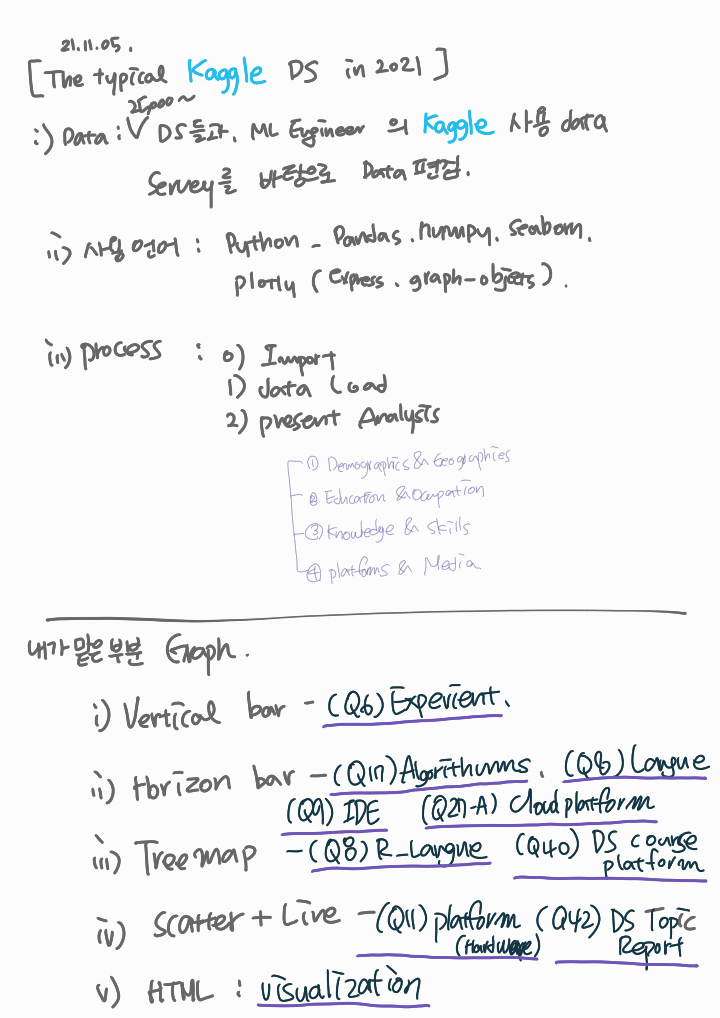
    • (Q6) Experience : 52% 넘는 응답이 3년이상 코딩과 프로그래밍을 했다. -bar vertical (위)
    • (Q17) Algorithms : Linear or Logistic Regression 55% 과 Decision tree or Random Forests, respectively 66% 사용. - bar horizon (옆)
    • (Q7) Languages : python 84%, SQL 41% 사용 -bar horizon
    • (Q8) Recommend_Leng: programming에 추천하는 언어는 81%가 python -Treemap
    • (Q9) F_EG /w Q7 가장 많이 쓰는 IDE : jupyter Notebook26.2%, VSCODE 13.92% - bar horizon
  4. Platforms & Media4. Platforms & Media
    • (Q11) Platform: 많이 쓰는 컴퓨터 플랫폼은 랩탑이 66% -Scatter + line
    • (Q27_A)cloud_platform: 아마존 14%, 구글클라우드 12%, 마쏘 아줠 9% - bar horizon
    • (Q40) courses: DS들이 많이 쓰는 course 플랫폼 Coursera 20, Kaggle 18%-Treemap
    • (Q42) media : DS topic report를 위해 많이 쓰는 media는 kaggle 44%, youTube 40%, blog 31% -scatter + line
    • Takeaways : typical Kaggle DS in 2021 :HTML picture n line n text
1
2
3
4
5
6
7
8
9
10
11
12
13
14
15
16
17
18


# This Python 3 environment, PKG Load
import numpy as np # linear algebra
import pandas as pd # data processing, CSV file I/O (e.g. pd.read_csv)

# Input data files : "../input/"
# Running : Shift+Enter

import os
for dirname, _, filenames in os.walk('/kaggle/input'):
for filename in filenames:
print(os.path.join(dirname, filename))

# ~ 20GB ,/kaggle/temp/


/kaggle/input/kaggle-survey-2021/kaggle_survey_2021_responses.csv
/kaggle/input/kaggle-survey-2021/supplementary_data/kaggle_survey_2021_methodology.pdf
/kaggle/input/kaggle-survey-2021/supplementary_data/kaggle_survey_2021_answer_choices.pdf
The Typical Kaggle Data Scientist in 2021


Remade By @YoonHwa-P

HTML code는 Markdown 형식으로 넣을 수 있게 해 준다.

scr : 구글 팟케스트에서 바로 연결하여 사용.

1
2
3
4
5
6
7
8
9
10
11
import pandas as pd
import numpy as np
import seaborn as sns
import plotly.express as px
import plotly.graph_objects as go

import warnings
warnings.filterwarnings('ignore')


시각화, 계산을 위해 Pandas, Numpy, seaborn을 이용 할 것이고, 동적보드를 만들기 위해 plotly를 이용 하였다.

plotly 중에서 Express와 Graph_objects를 가져와서 사용 할 예정인듯.

plotly-express

The Plotly Express API in general offers the following features:

Every PX function returns a** plotly.graph_objects.Figure object**, so you can edit it using all the same methods like update_layout and add_trace.

input으로 Express를 사용 한다면 Graph_objects가 동적 plotly 를 만드는 것 같다. : update 하거나 trace를 가능 하게 하는듯.

실제 필사할 data에서는 어떤 data가 있는지 확인 해 보지 않았지만,
나는 배우는 입장이니 어떤 data가 있는지, 어떤 head가 있는지 확인 해 보도록 한다.

맨 위에 가보면 Note가 생성 될때

/kaggle/input/kaggle-survey-2021/kaggle_survey_2021_responses.csv
/kaggle/input/kaggle-survey-2021/supplementary_data/kaggle_survey_2021_methodology.pdf
/kaggle/input/kaggle-survey-2021/supplementary_data/kaggle_survey_2021_answer_choices.pdf

위와같은 file dir을 알려준다. 이제, pandas로 이 files를 로딩 시켜 주면된다.

Ref. Kaggle활용.국문

1
2
3
4
5
6
7
8
df = pd.read_csv("../input/kaggle-survey-2021/kaggle_survey_2021_responses.csv")
df = df.iloc[1:, :] #이건 왜 선택 해 놓은 것일까요?
df.head()

df.info()


<class 'pandas.core.frame.DataFrame'>
RangeIndex: 25973 entries, 1 to 25973
Columns: 369 entries, Time from Start to Finish (seconds) to Q38_B_OTHER
dtypes: object(369)
memory usage: 73.1+ MB

df에 pd.read_csv로 csv file을 읽어 옵니다.

역시 pd인 df객체에 iloc을 이용하여 [ 1행부터 : , : ] iloc를 선택 해 놓았다.

  1. 행번호(row number)로 선택하는 방법 (.iloc)
  2. label이나 조건표현으로 선택하는 방법 (.loc)

Ref. loc를 이용한 행 선택


0. Introduction

This notebook will explore the fascinating results obtained from the survey conducted by Kaggle in September 2021. Over 25,000 data scientists and ML engineers participated, providing information on their backgrounds and experience in their occupations.

To increase readability, this report is divided into four sections:

  1. Demographics & Geographics
  2. Education & Occupation
  3. Knowledge & Skills
  4. Platforms & Media


Introduction
이 노트북은 25000 data scientist들과 ML Engineer들의 kaggle에서 경험 한것을 조사한 data를 매력적인 결과로 탐험 하게 될 것이다.
(대충)

; Introduction 에서 이 notebook의 성격, data의 간간한 정보, 목차 등을 설명.


모든 글은 Markdown을 이용한 css 로 작성 된 것 같다.


혹시,
css
에 대하여 더 알아보고 싶으면, 이 문서를 참조 하자.


Index

GitHub Index
made By @YoonHwa-P


Python

DBS


올려야 하는 Posting List

  • 의사결정트리, Regression
  • seaborn
  • matplotlib

수정 해야 할것도 넘넘 많다.
일단 이번 주 주말에는 Kaggle 먼저 (Team project 닌까.)

  • * : 수정중
1
2
3
<hr style="dashed 10px pink;">
<hr align="center" style="border: solid 10px #304A84; width: 50%;">
<span style="font-size:150%; color: Red;"> * </span>

※ 참고 할 Github

ㅁ https://github.com/dschloe/R_edu

ㅁ https://github.com/JunghoGIT

ㅁ https://github.com/kimgoden/JAVA01

ㅁ https://github.com/WDWDWWDff/Red

ㅁ https://github.com/OliverKang

ㅁ https://github.com/hanbeen1992

ㅁ https://github.com/kjw1390